Pixel Live Root: One-Click Root for Stable and Beta Builds
Root (LIVE) in GSM6 Pixel Tool Pro prepares a root profile for the build actually installed on your Pixel, including supported beta builds. Connect the phone, let the tool read its identity and firmware details, and start the guided operation from the Main tab. There is no separate manual boot-image selection or patching stage for the user.
The feature is designed for Pixel 1–11 models. Coverage includes stable releases and supported beta firmware, with exact-build resource availability checked during the operation. That last check matters: “Pixel supported” is not permission to reuse an image from a different monthly update.
Find the current installer and interactive feature explorer on the GSM6 Pixel Tool Pro page. For preview firmware specifically, use the focused Pixel beta root guide.
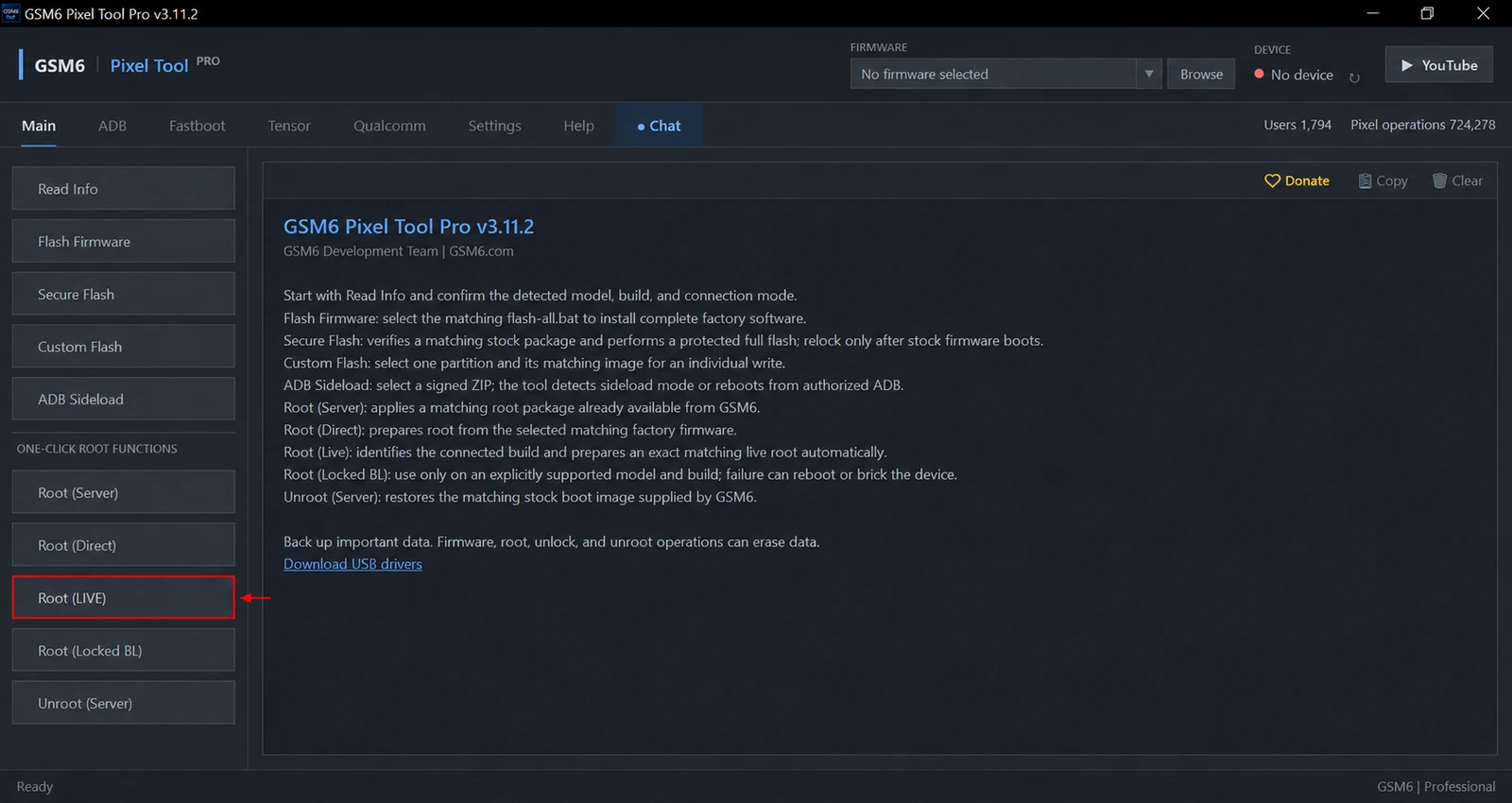
What Live Root does
Live Root reads the connected device’s model, codename and installed build. GSM6 uses that information to prepare a matching server root profile, then the tool handles the supported root preparation and device stages. Public instructions do not require users to follow internal service procedures or choose files by guesswork.
This is useful after a new update, when a ready-made root package for the exact build may not already be in the normal server catalogue. Instead of choosing the nearest-looking package, the technician starts with the current phone and lets the live workflow establish the match.
| Root option | Starting point | Best fit |
|---|---|---|
| Root (LIVE) | Connected device and its installed build | Automatic matching, including supported beta builds |
| Root (Server) | Existing matching GSM6 server resource | A build already available in the catalogue |
| Root (Direct) | Matching firmware selected by the user | Technician already has the correct factory package |
| Root (Locked BL) | Exact supported locked-bootloader profile | Temporary service access on listed builds |
These options solve different problems. Live Root is not the same operation as temporary root with a locked bootloader.
Requirements before starting
- A Windows PC, the current tool release and a signed-in GSM6 account with paid Pixel access.
- One connected Pixel with Android running and USB debugging authorized.
- A stable internet connection for the live profile and required resources.
- Working USB drivers, a reliable data cable and enough free storage.
- A complete backup of photos, accounts, application data and anything else that matters.
- A device whose bootloader permits the changes requested by the workflow.
Install the official Google USB driver for Windows if the phone does not appear correctly. A driver fixes communication; it does not change firmware support or enable an OEM Unlocking option that the device does not permit.
Live Root erases user data. The confirmation in the current tool explicitly warns that apps, photos, files and accounts are removed and that the bootloader may be unlocked. Do not start it as a harmless root check.
How to use Root (LIVE)
- Install the latest GSM6 Pixel Tool Pro and sign in with the account holding your activation.
- Connect only the target phone. Unlock its screen and approve the computer’s USB debugging prompt.
- Use Read Info and review the model, codename and complete build number.
- In Main, select Root (LIVE).
- Read and accept the data-erasure confirmation only after the backup is complete.
- Allow the tool to prepare the matching profile and follow any on-device bootloader confirmation.
- Keep USB and internet connected until the tool reports the final result.
- After Android starts, verify root through the installed root manager and check normal device operation.
A progress percentage is not a success result. Wait for the final message and verify the phone itself before closing the job.
Stable, beta and updated builds
The advantage of a build-matched workflow is especially clear on beta firmware. Preview and QPR releases can have different identifiers from stable firmware for the same model. A matching model name alone does not establish a matching root resource.
When an update changes the build, repeat identification before the next root operation. Do not carry over a profile simply because it worked last month. For beta-specific preparation, limitations and recovery planning, read rooting Pixel beta builds.
Live Root still depends on the device and the live service. If an exact source is unavailable or the tool refuses the build, stop rather than changing the detected profile. Root (Direct) is the alternative when you have the exact compatible firmware yourself.
When Live Root cannot continue
| What you see | What to check next |
|---|---|
| No device or authorization required | Driver, data cable, unlocked screen and USB debugging approval |
| Paid access required | Correct GSM6 account and current activation |
| Matching build unavailable | Record the exact build and contact support; do not select another build |
| Bootloader unlock rejected | Confirm the device legitimately allows OEM unlocking |
| Device remains in another mode | Copy the output and report its current screen before retrying |
Save the full output, tool version and detected build when requesting assistance through GSM6 Support. Never share account passwords or authenticator secrets.
After root: backup and returning to stock
Use ADB partition backup for supported maintenance jobs that require a partition image. Label each backup with its original model, build and slot. Root does not make images interchangeable between phones.
When returning to stock, distinguish restoring a matching boot image from preparing the entire phone for relocking. Secure Bootloader Relock requires an eligible stock system. If the system has been modified, use Secure Flash first.
Does Live Root support beta firmware?
Yes. GSM6 Root (LIVE) includes supported beta builds and matches the workflow to the exact installed build. Resource availability and device eligibility are checked during the operation.
Is Live Root a no-wipe operation?
No. The current Live Root workflow erases user data and may unlock the bootloader. Back up first and read the confirmation.
Do I need to patch boot or init_boot manually?
No. Live Root handles the supported preparation automatically. If you want to supply matching firmware yourself, choose Root (Direct) instead.