Qualcomm USB Drivers: Windows Interface and Provenance Guide
Qualcomm-based phones can expose different USB interfaces depending on boot state and vendor configuration. Windows may show QDLoader 9008 in Emergency Download mode, a DIAG port from a running modem, modem/serial interfaces, or normal Android ADB/Fastboot interfaces. Installing a driver only binds Windows to the exposed hardware ID; it does not place a phone into a mode, authorize a programmer, or repair firmware.
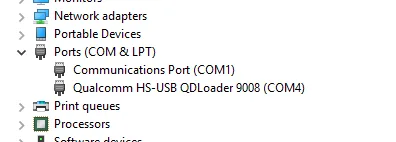
Identify the interface first
| Windows observation | Likely interface | What it proves |
|---|---|---|
| Qualcomm HS-USB QDLoader 9008 | EDL transport | The device enumerated in EDL; flash authorization is still unknown |
| Qualcomm diagnostic/DIAG port | Running-modem diagnostic interface | The port is exposed; supported NV operations remain device-specific |
| Android ADB Interface | Authorized Android debugging | Android booted and the host was authorized |
| Android Bootloader Interface | Fastboot transport | The bootloader transport is available |
| QHSUSB_BULK or unknown device | Missing/mismatched binding or unstable device state | Inspect hardware IDs and cable/power before choosing a package |
| 900E or repeated disconnects | A different/error state or hardware instability | A driver reinstall alone may not resolve it |
Driver provenance
The prior MEGA package is a third-party mirror whose publisher and signing chain were not established. Treat it as unauthenticated. Prefer the device OEM’s service package or a driver supplied with an authorized tool. Before installation, inspect the catalog signature, certificate chain, INF hardware IDs, package version, source URL, and SHA-256 hash.
Do not disable Windows driver-signature enforcement as a routine instruction. If a package requires an unsigned driver, stop and verify why.
Installation and verification
Extract the package without running unrelated executables. In Device Manager, select the device, inspect Properties → Details → Hardware Ids, then bind only an INF listing that ID. After installation, verify Driver Provider, Digital Signer, version, date, and the expected interface name.
A successful COM-port listing is the end of driver validation, not proof that QFIL, QPST, or an NV tool supports the phone. Record the port and hardware ID before any service operation.
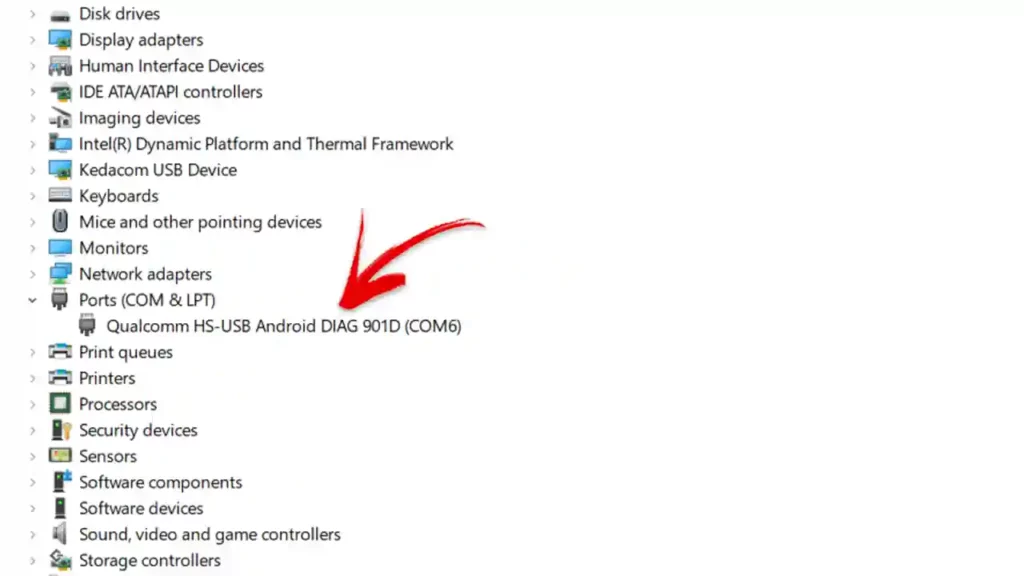
Troubleshooting
Try a known-good data cable, a direct motherboard USB port, and a stable power state. Remove only the specific incorrect device binding when necessary; do not broadly delete unrelated USB drivers. For rapid connect/disconnect cycles, preserve the hardware IDs and timestamps and consider battery, storage, board, or boot-loop faults.
Video record
The established article URL is /qualcomm-usb-drivers-download-latest-version-2025/; legacy URLs should redirect to this existing destination.